
Settings

The Settings window provides access to all configuration options. Open it by:

  • Right-clicking the tray icon → Settings
  • Pressing the Settings hotkey (if configured)
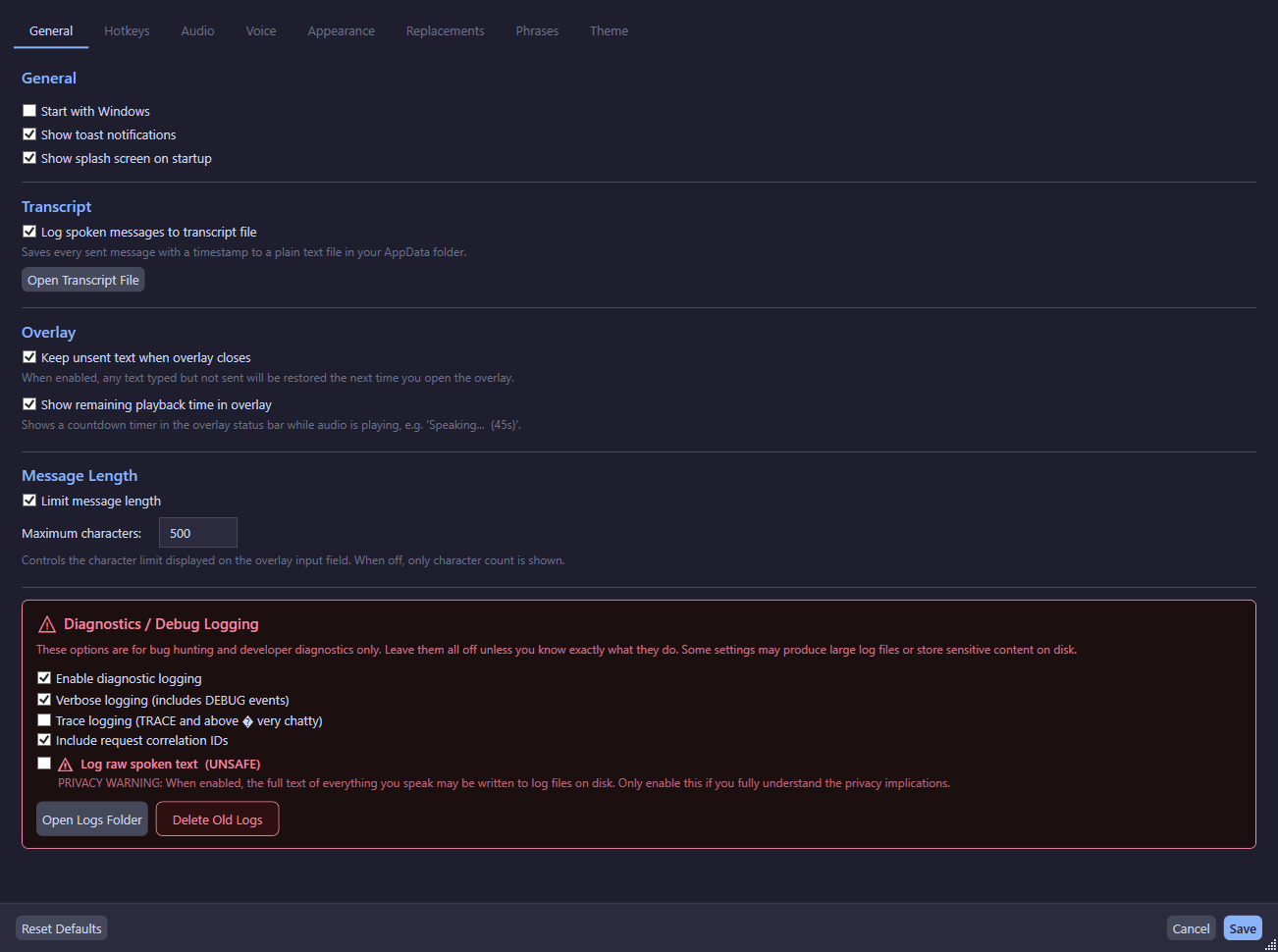
Settings window showing the tabbed interface with General, Hotkeys, Audio, Voice, Phrases, Appearance, and Theme tabs.

General Tab

General Options

Setting Default Description
Start with Windows Off Launch the app automatically when you log in
Show notifications On Show toast notifications for events
Show splash screen On Show the splash screen on startup
Enable transcript logging Off Log all spoken text to transcript.txt
Keep overlay text Off Preserve unsent text when overlay closes
Enable character limit On Limit overlay input to max characters
Max overlay input length 500 Maximum characters when limit is enabled
Show playback timer On Show remaining time in overlay during playback

Diagnostic Logging

Setting Default Description
Enable diagnostic logging Off Write structured JSONL session logs
Verbose logging Off Include DEBUG-level events
Trace logging Off Include TRACE-level events (very chatty)
Include request IDs Off Attach correlation IDs to TTS pipeline events
Log raw text Off Warning: may capture sensitive/private content

Hotkeys Tab

Configure global hotkeys for various actions:

Hotkey Default Description
Overlay hotkey Ctrl+Shift+Space Open the overlay window
Stop hotkey Ctrl+Shift+Backspace Stop current playback
Settings hotkey (none) Open the Settings window
Resend hotkey (none) Repeat the last spoken message
Override hotkey Ctrl+Enter Stop current audio and send overlay text immediately

Audio Tab

See Audio Output for full details.

Setting Default Description
Monitor Output (first run) Your headphones/speakers
Secondary Output (first run) Virtual cable input
Monitor Volume 100% Volume for monitor output
Secondary Volume 100% Volume for secondary output
Trim Trailing Silence Off Remove silence from end of audio
Silence Retention 100% How much silence to keep (5–100%)

Voice Tab

See Voices for full details.

Setting Default Description
TTS Engine Kokoro Kokoro (offline) or ElevenLabs (cloud)
Kokoro Voice AF Heart Select from available Kokoro voices
ElevenLabs Voice (none) Select from fetched ElevenLabs voices
Global Pitch 1.0 Pitch multiplier (0.5–2.0, applies live)
ElevenLabs API Key (none) Encrypted with DPAPI

Appearance Tab

Setting Default Description
Overlay Width 720 Width of the overlay window
Overlay Height 160 Height of the overlay window
Overlay Opacity 0.93 Background opacity (0.20–0.95)

Opacity changes are previewed live on the open overlay window.

Phrases Tab

See Phrase System for full details.

Theme Tab

See Themes for full details.

Replacements Tab

See Text Replacements for full details.

Save Behavior

  • The Save button persists all changes to config.json
  • Hotkeys are re-registered after save (no restart needed)
  • A save toast notification appears (debounced to prevent spam)
  • The Cancel button reverts all unsaved changes
  • The Reset Defaults button resets all settings to factory defaults